English


Headscale vs Tailscale: When Self-Hosting Your Network Makes Sense


Key terms in plain English
- 🧭 Coordinator (coordination server): The service that tracks devices, helps them find each other, and shares connection rules.
- 👨💻 Operator: The person or team keeping that service running and updated—either you or the provider.
- 💻 Client: The app installed on a laptop, phone, or server so it can join the private network.
The real choice: run the coordinator or delegate it?
You are away from home and need your laptop to reach a home server or internal development tool without making that application public. With Headscale, you run the coordinator; with Tailscale, the provider does. Self-hosting means running that service on a server you administer; a rented server counts. Your devices normally keep using the Tailscale client app.
Tailscale also offers a free Personal plan for non-commercial use, so self-hosting is not automatically a saving. Favor Headscale when you want to run the coordinator, its capabilities fit your network, and someone will maintain it. Favor Tailscale when you want the provider to handle that work. Compare control, everyday fit, maintenance, and actual cost—not license fees alone.

How Headscale and Tailscale fit together
A tailnet is the private network of connected devices. Tailscale supplies both the device clients and a managed coordination service. This coordination layer—the control plane—manages membership and distributes the information devices need to connect.
Headscale is an independent, open-source implementation of that coordination server. It is not Tailscale’s official self-hosted edition, a fork, or a copy of the whole hosted platform. Its intended scope is a single modest network, particularly for self-hosters and homelabs.
Think of the coordinator as a device directory and access list. It distributes device details, public keys, and permissions; clients enforce the connection rules. The directory is not the route every file takes. Devices exchange traffic using WireGuard, the encryption and tunnel technology behind those connections. The coordination/traffic distinction looks like this:
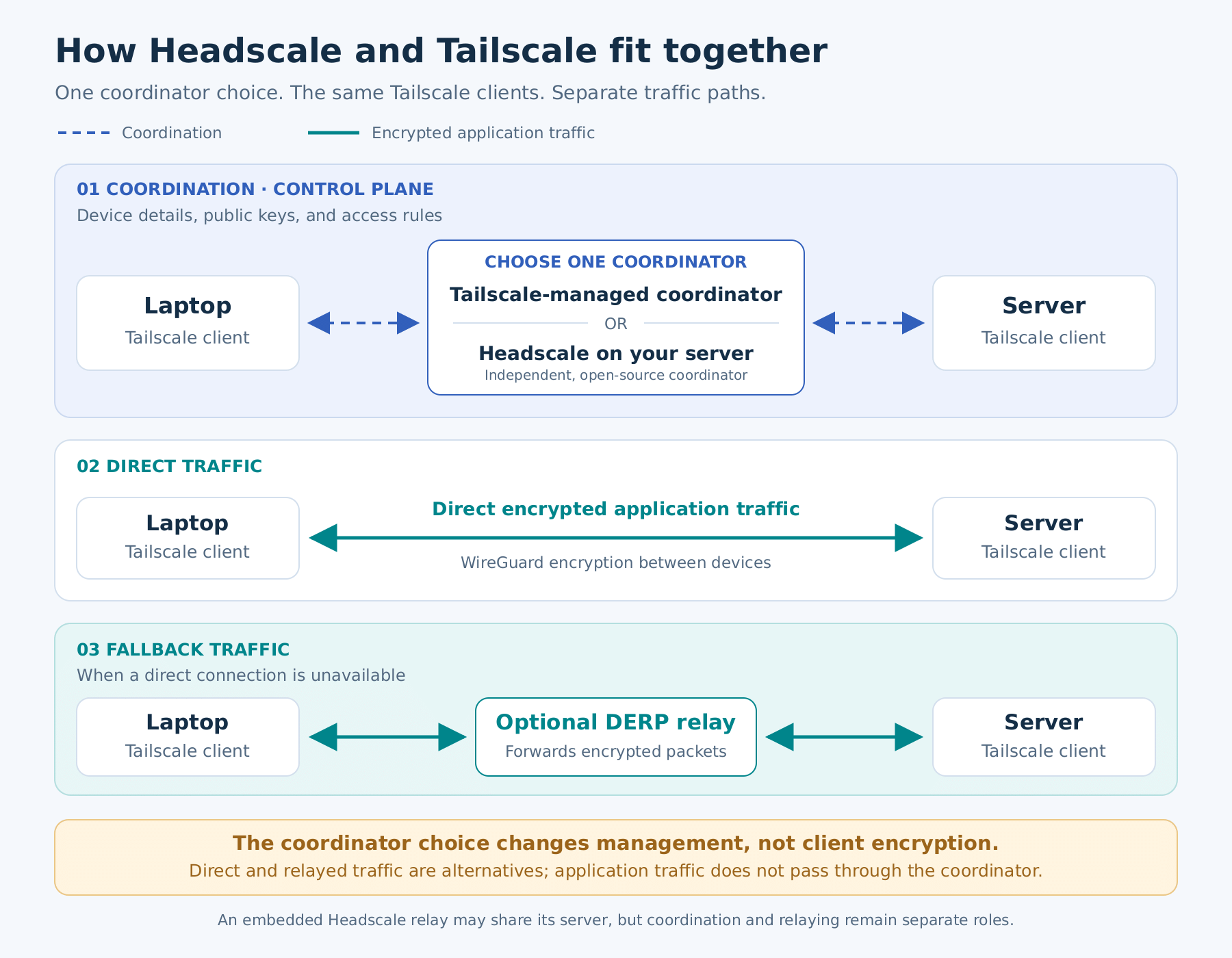
The coordinator choice changes management, not client encryption. Application-traffic paths are shown; an embedded Headscale relay may share its server but remains a separate role.
A relay forwards packets between devices when a direct connection is unavailable. A DERP relay forwards encrypted traffic without decrypting its contents, and also helps devices establish connections. The extra hop can affect performance and hosting resources; neither product has an inherent speed advantage from coordinator location alone.
Headscale vs Tailscale at a glance
Shared clients and encrypted connections do not make the services equivalent. These six criteria capture the differences that affect your decision.
| Criterion | Headscale | Tailscale |
|---|---|---|
| 🌐 Coordination ownership and placement | You choose infrastructure and where coordination state resides | Provider operates and hosts the coordination service |
| 🛠️ Everyday administration | Command-line tools, automation interface, and configuration-led management | Integrated admin console and device enrollment workflow |
| 🧩 Features and client fit | Tailscale clients; verify release and platform compatibility | Integrated platform; available features depend on your plan |
| 🛡️ Security and operational responsibility | You maintain coordinator, endpoints, and access policies | Provider maintains coordinator; you secure endpoints and policies |
| 💰 Software and service costs | No software-license fee; hosting and operating costs remain | Free non-commercial Personal plan; paid organizational plans |
| 🤝 Support | Upstream community; hosting support has a separate scope | Best-effort business-hours help; paid plans can purchase response-time commitments |
Control and privacy: what self-hosting actually changes
Suppose your network’s coordination records must stay on infrastructure and in a location you choose. Headscale lets you administer the coordination database and server configuration rather than delegate them to Tailscale. You also choose the host and location, along with backup arrangements for those records. That gives you control over which administrators have access and how the records are handled.
Those records are coordination metadata: information such as device names and addresses, public keys, and network/access configuration. They describe your network, not the files, database contents, or documents your applications store. Tailscale’s managed coordinator does not normally carry your application payloads either.
Note: Headscale can use Tailscale’s public relays; adding an embedded relay does not automatically replace them. Relay choices, identity providers, and client logging remain separate dependencies to review.
Placement control is useful, but it is not automatic compliance or stronger security. Your hosting provider remains part of the trust model, as do chosen identity services and device software. You still need to protect the coordinator, restrict administrative access, and secure connected devices. A compromised laptop does not become trustworthy because its coordinator is self-hosted.
Make the requirement specific: which coordination records must you administer, and where should they be kept? That gives you a reason to accept Headscale’s management work. Next, assess whether its enrollment and permission tools suit your workflow.
Daily use and compatibility: similar clients, different experience
Tailscale’s integrated admin console covers routine work such as enrolling devices, reviewing membership, and changing access. With Headscale, you work mainly through command-line tools and configuration. Its administration API provides an interface for automation. Headplane is a separately maintained optional community web interface, not built-in Headscale functionality or part of the hosting package described below.
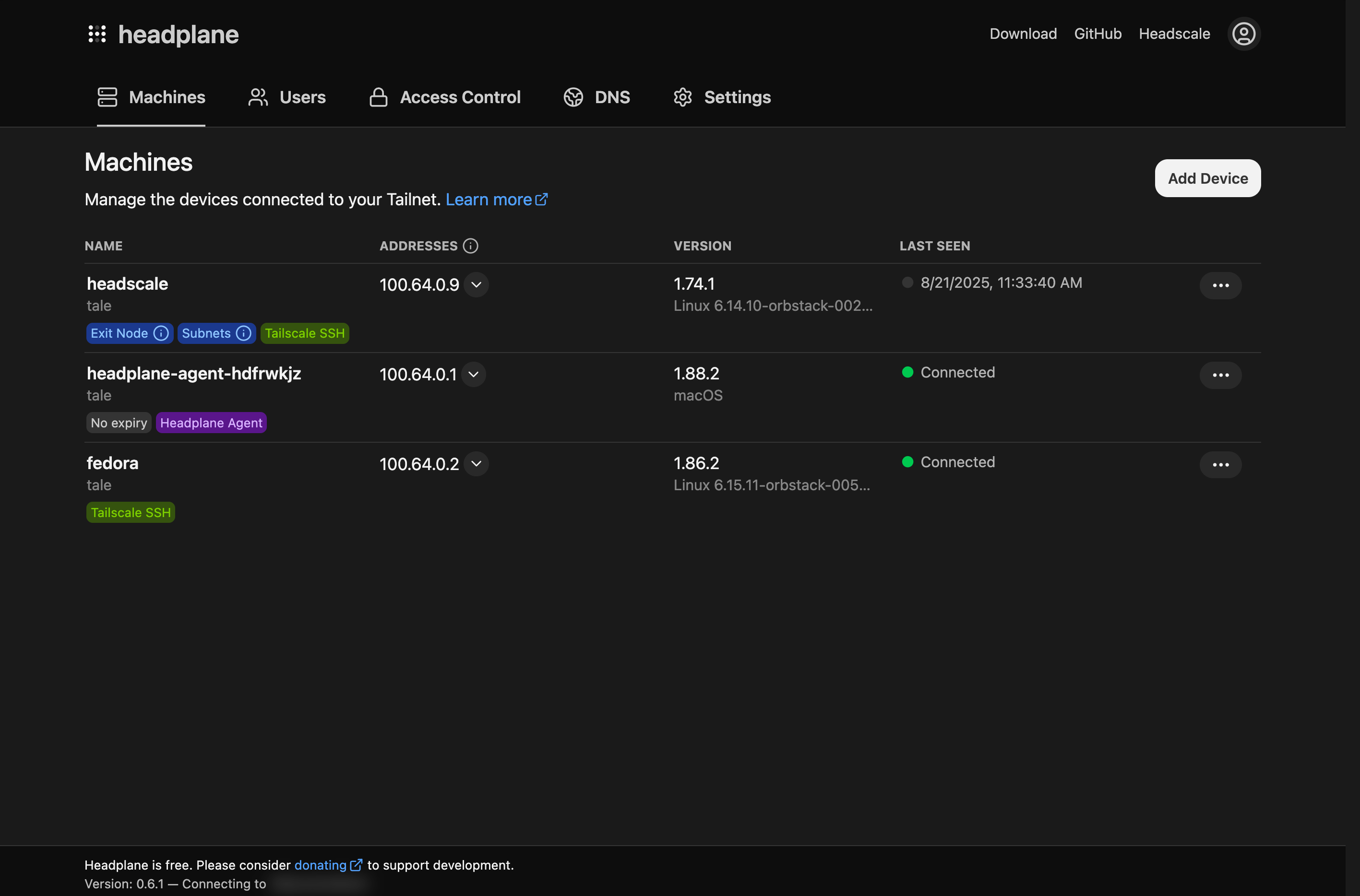
Enrollment adds a step: direct the Tailscale app to your Headscale server, using the method for that platform. Headscale’s client guidance says it aims to support the last ten Tailscale client releases. Use your server release’s minimum requirements and release notes to check the devices you plan to connect. Both options cover useful core capabilities:
- MagicDNS: Reach devices by readable names rather than remembering their private addresses.
- Access rules: Define permitted connections; ACL means “access control list.”
- Subnet routers: Reach existing local-network devices without installing the client on each one.
- Exit nodes: Optionally send internet traffic through a device you configure and select.
Beyond that core, check the release-specific gaps. In Headscale v0.29.7, its tagged feature checklist marks Funnel and network flow logs unsupported. Funnel intentionally exposes a service publicly, unlike the private-access goal here. Flow logs record connections, not application payloads; Tailscale currently includes them on Premium and above. An exit node does not automatically turn either option into an anonymous-browsing service.
For a group, integrated user/group provisioning and administrative roles may justify an appropriate Tailscale plan; availability varies by tier. Before comparing prices, check how users will be added, assigned access, and removed—not only whether their devices connect. Once that workflow fits, the next question is who maintains it.
Operations and security: what you still need to own
A self-hosted Headscale server must be reachable over HTTPS; the private applications themselves need not become public. Headscale’s upgrade guidance calls for reviewing configuration and preparing backups before updates. Those backups need to preserve the data and configuration required to recover the service. Tailscale handles its managed coordinator’s upkeep; Headscale’s operator remains accountable even when hosting tools automate tasks.
With either option, keep devices secure and updated. Give each person only the access they need, and remove it promptly when they leave. Updating Headscale does not apply fixes to the Tailscale clients on laptops, phones, or servers. Use the release notes to plan both server and client updates.
Tailscale’s outage explanation explains how existing connections can persist with known peers and cached rules. During a coordinator outage, new devices cannot enroll, and changes to access rules cannot reach the network. Keys cannot be refreshed or revoked either, affecting both renewal and withdrawal of device access. Existing connections remain subject to key expiry and changing network paths, so this is not a guarantee of uninterrupted Headscale service. A failed relay sharing Headscale’s server can separately break relay-dependent connections. Before choosing Headscale, confirm these four things:
- An accountable operator: Someone owns maintenance, removal of departing users, and incident response for this network.
- Compatible devices: The selected server release, client versions, and platforms fit your actual mix of devices.
- Recoverable state: Database, server configuration, access policies, and required server keys have understood backup and restoration arrangements.
- Independent emergency access: You can reach the server or provider console without relying on this private network.
Our published AVA.HOST Headscale Cloud App offering lists one-click deployment with HTTPS for the coordinator. It also lists automatic application updates and scheduled backups to reduce routine upkeep. Terminal access remains available for administration beyond the initial deployment.
You still decide who can join and what they may access. The scheduled backups cover the data directory, so keep separate copies of policies or configuration stored elsewhere. Ask how long backups are kept and how you would restore the service if needed.
Cost: free software is not a free service
Start with eligibility. Tailscale’s Personal plan is $0 for non-commercial use, with up to six users and unlimited user devices. Shared infrastructure has separate tagged-resource allowances—currently 50 included. A five-person business is not automatically a free Personal use case. For an eligible homelab, the financial question is whether Headscale’s control benefits justify taking on operating costs.
Checked 20 November 2026, Tailscale lists Standard at $8/user/month, Premium at $18/user/month, and Enterprise at custom pricing. You pay for the seats you purchase; extra shared resources and optional add-ons can increase the bill. For a small group, the seat charges look like this:

Illustrative cost example: Five purchased Standard seats at $8/user/month cost $40/month, or $480 over 12 monthly payments at that rate, before taxes, add-ons, or discounts. This prices the managed plan, not an equivalent Headscale service.
Headscale has no software-license fee, but you still need to fund the server and any public-IP charges. A domain is optional; backup and relay services may add costs depending on your deployment. Administration also takes time, including setup, maintenance, and recovery. A useful framework is:
Annual Headscale cost = 12 × recurring monthly infrastructure/service costs + annual-only costs + administration and recovery time valued in money.
Use one currency and the same 12-month period throughout, counting only actual expenses. Do not double-count backups included in hosting, though your recovery needs may require extra provision. Existing hardware can lower cash outlay without making maintenance free. The hosting package above requires a dedicated IP; confirm the full charges rather than treating its advertised starting tier as the complete deployed price. Headscale can reduce recurring subscription costs for a suitable group, but compare matching requirements and operating effort before calling it cheaper.
Which should you choose? Three realistic situations
Use the ownership, feature, and maintenance checks together. Here is how they change three common decisions.

A homelab where coordination ownership matters.
You want your laptop and phone to reach a home server and are willing to run the coordinator. Tailscale Personal already offers a convenient $0 service for eligible non-commercial use. For you, though, choosing where coordination records live is part of the goal, not merely a way to avoid a subscription. Choose Headscale for that control.
A small technical group accessing internal tools.
A modest team needs private access to development servers or internal services. Tailscale is the better choice if a required capability is missing or there is no one to run the network. Where the device and feature checks have passed, and the team has an operator, choose Headscale for this focused private-access setup.
An organization that needs integrated governance.
Your organization needs integrated provisioning or administrative roles for managing users. Connection visibility or contracted support may also drive the decision. Choose Tailscale and select the plan around those needs. Add a support package if response-time commitments are required; those commitments do not come automatically with every paid seat.
For a modest network whose owner wants that control, Headscale is a strong self-hosting choice. It can meet the opening need—private access to a server or internal tool—without publishing the application. If the feature and readiness checks point that way, AVA.HOST’s Headscale Cloud App offers a hosting next step. If not, choose managed Tailscale.
Related Posts