English





How to Fix the “PHP Max Input Vars Limit” Error in WordPress
🚀 How to Fix the “PHP Max Input Vars Limit” Error in WordPress
If you’re building or managing a WordPress site and suddenly encounter the error:
“Warning: Max Input Vars limit reached”
or
“Increase max_input_vars to a higher value.”
…it means your server is blocking PHP from processing too many input fields — often seen when saving large menus, page builders (like Elementor or WPBakery), or form submissions.
In this advanced article, we’ll cover:
- ✅ What the max_input_vars directive is
- 🧠 How it affects WordPress
- 🔧 How to fix it via multiple methods (php.ini, .htaccess, wp-config, Nginx, cPanel, etc.)
- 🔐 Best practices and security considerations
🔍 What is max_input_vars?
max_input_vars is a PHP directive that limits how many input variables PHP can accept (via POST, GET, and REQUEST). This protects the server from hashing denial-of-service attacks, but also affects legitimate operations in CMS platforms.
Default value:
If you exceed this limit (e.g. saving a WordPress menu with 1000+ items), PHP cuts off the input, and WordPress silently fails to save all changes.
📌 When You’ll Encounter the Error
- Saving large navigation menus
- Saving pages with lots of form fields
- Using page builders with complex layouts
- Plugins like WPML, Elementor, WooCommerce
🛠️ Fixing the Error: 6 Proven Methods
✅ 1. Modify php.ini (Best method if you have root or VPS access)
This is the cleanest way to change max_input_vars if you’re running your own server:
Step 1: Locate or create a php.ini file (depends on server):
Replace 8.1 with your PHP version.
Step 2: Find and edit the directive:
max_input_vars = 3000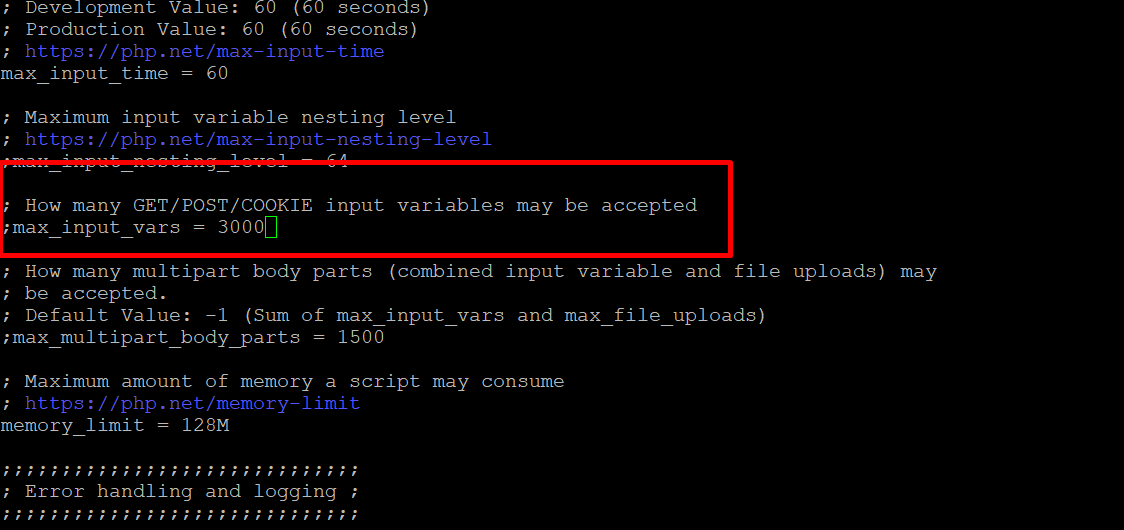
Step 3: Restart your web server:
or
✅ 2. Update .htaccess (For Apache users with shared hosting)
If you can’t access php.ini, try editing .htaccess in the root of your WordPress installation:
<IfModule mod_php.c>
 php_value max_input_vars 3000
 </IfModule>
⚠️ This only works if mod_php is enabled. Some hosts use PHP-FPM instead, where this method won’t work.
✅ 3. Use wp-config.php (Not always effective)
WordPress does not natively support overriding max_input_vars, but in some configurations, adding this might work:
Place it above the line that says:
✅ 4. Modify User php.ini or php_value in cPanel
If you’re using shared hosting with cPanel:
- Go to cPanel > Select PHP Version > Options
- Look for max_input_vars and increase to 3000 or higher
- Save and check phpinfo() to confirm
✅ Works instantly — no restart required.
✅ 5. Use .user.ini (For PHP-FPM or CGI environments)
Create or edit .user.ini in your root WordPress folder:
Then restart PHP (or wait 5+ mins if the host applies changes automatically).
✅ 6. For NGINX + PHP-FPM Servers
NGINX doesn’t use .htaccess, so configure PHP via FPM pool or php.ini.
Edit /etc/php/8.1/fpm/php.ini:
Then restart:
sudo systemctl restart php8.2-fpm
 sudo systemctl restart nginx
🧪 How to Confirm It’s Working
Create a phpinfo.php file in your WordPress root:
Access it via browser: https://yourdomain.com/phpinfo.php
Search for max_input_vars and verify it’s updated.
🧼 Don’t forget to delete the file afterward — it exposes sensitive server info.
🛡️ Best Practices
| Recommendation | Reason |
|---|---|
| Don’t set max_input_vars to 999999 | Can lead to DoS vulnerabilities |
| Stick to 3000–5000 | Enough for large menus/page builders |
| Monitor memory limits | Large input vars = more memory usage |
| Use phpinfo() or ini_get() to debug | Avoid guesswork |
💡 Bonus: Increase Other Related Limits
Sometimes, this issue is accompanied by other limits being hit:
max_execution_time = 300
 memory_limit = 512M
 post_max_size = 64M
 upload_max_filesize = 64M
These can also go in php.ini, .htaccess, or .user.ini.
🧭 Final Thoughts
Understanding and Fixing the max_input_vars Error in WordPress.The max_input_vars error is a subtle but potentially disruptive issue in WordPress that often goes unnoticed—until something critical breaks. This PHP configuration directive controls the maximum number of input variables (such as form fields or menu items) that your server will process in a single request. If this limit is too low, it can silently prevent parts of your website from saving changes properly, especially in complex environments.
Where the Problem Appears
This error typically surfaces in the following scenarios:
Large or nested WordPress menus: When building detailed menu structures, only part of the menu may save, or changes may disappear after saving.
- Multilingual websites: Plugins like WPML or Polylang rely heavily on form submissions with a large number of input fields for each language.
- Page builders: Drag-and-drop tools such as Elementor, WPBakery, or Divi may encounter issues when saving layouts with many elements or rows.
- Theme or plugin settings: Some themes and plugins with rich configuration panels may not save all settings correctly if the limit is exceeded.
- The worst part? There’s often no visible error message—the changes simply don’t apply, leaving you wondering what went wrong.
Related Posts