English





Plausible vs Google Analytics: When Self-Hosted Analytics Makes Sense
Do you need a clearer dashboard or a deeper analytics platform?
Imagine your small software business publishes a guide, directs readers to a pricing page, and offers a trial. You want three answers: which source brought visitors, which pages attracted them, and which campaign was associated with completed signups. A completed signup is a conversion—a useful business outcome.

Plausible Community Edition (CE) fits focused reporting and control over the installation when someone capable can operate it. Standard Google Analytics 4 (GA4) is the stronger fit for deeper marketing workflows or delegating the analytics infrastructure. Both can answer everyday website questions.
This is not free software versus a paid service. Standard GA4 is free of charge. CE has no software-license fee, but hosting and maintenance cost money. The useful comparison is reporting fit, privacy, total cost, and who takes responsibility after setup.
What Plausible and Google Analytics actually do
Both collect pageviews and events—recorded actions—and show traffic and the outcomes you configure them to track. You decide which outcomes matter to your business.
CE is free, open-source software under AGPLv3-or-later, with a focused site dashboard. Self-hosting means running the application on infrastructure your operator chooses, including rented cloud servers. GA4 is a free, managed, event-based service with configurable website/app reporting. Paid Plausible Cloud and Analytics 360 are separate offerings, not contenders here.
Think of CE as a focused instrument panel and GA4 as a configurable analysis workbench. The workbench still has usable standard reports; the instrument panel’s narrower focus is not a quality downgrade.

[Visitor browser: Website tracking script] → [Plausible CE on chosen host] → [Dashboard]
Customer or scoped hosting partner operates destination.
[Visitor browser: Google tag] → [Google’s analytics infrastructure] → [GA4 reports]
Google operates backend; owner configures measurement/access.
Arrows show logical measurement flow; the script or tag runs inside the visitor’s browser, not on a separate server.
Both browser-side trackers send measurement to an analytics endpoint that supplies reports. CE’s destination is customer- or partner-operated; Google operates GA4’s backend. In both cases, the website owner chooses what to measure and who can access it.
Reporting simplicity and backend placement are separate choices. Compare usability, reporting/integrations, privacy/control, total cost, operations/support, and collection/page impact—not dashboard appearance alone.
Features that matter: traffic, signups, and marketing workflows
Suppose you want to check last week’s email campaign for the guide. Campaign tags are labels added to links; yours could use campaign guide-launch and source newsletter. Define success consistently in both tools: record completed account creation, not the “Start trial” click. A success-page pageview can represent completion if that page genuinely confirms it. The question is which signups were recorded against the campaign, rather than whether the email caused them.
In CE, configure a custom-event goal for completed trial signup, with the website sending the event when account creation succeeds. For the weekly check, set the date range to last week and filter for guide-launch. You can review campaign traffic, the pages receiving it, and signup goals in the same focused dashboard. Filtering by the goal narrows the source and page breakdowns to recorded conversions. Routine review mainly involves changing the period and filters, rather than choosing among different report types.
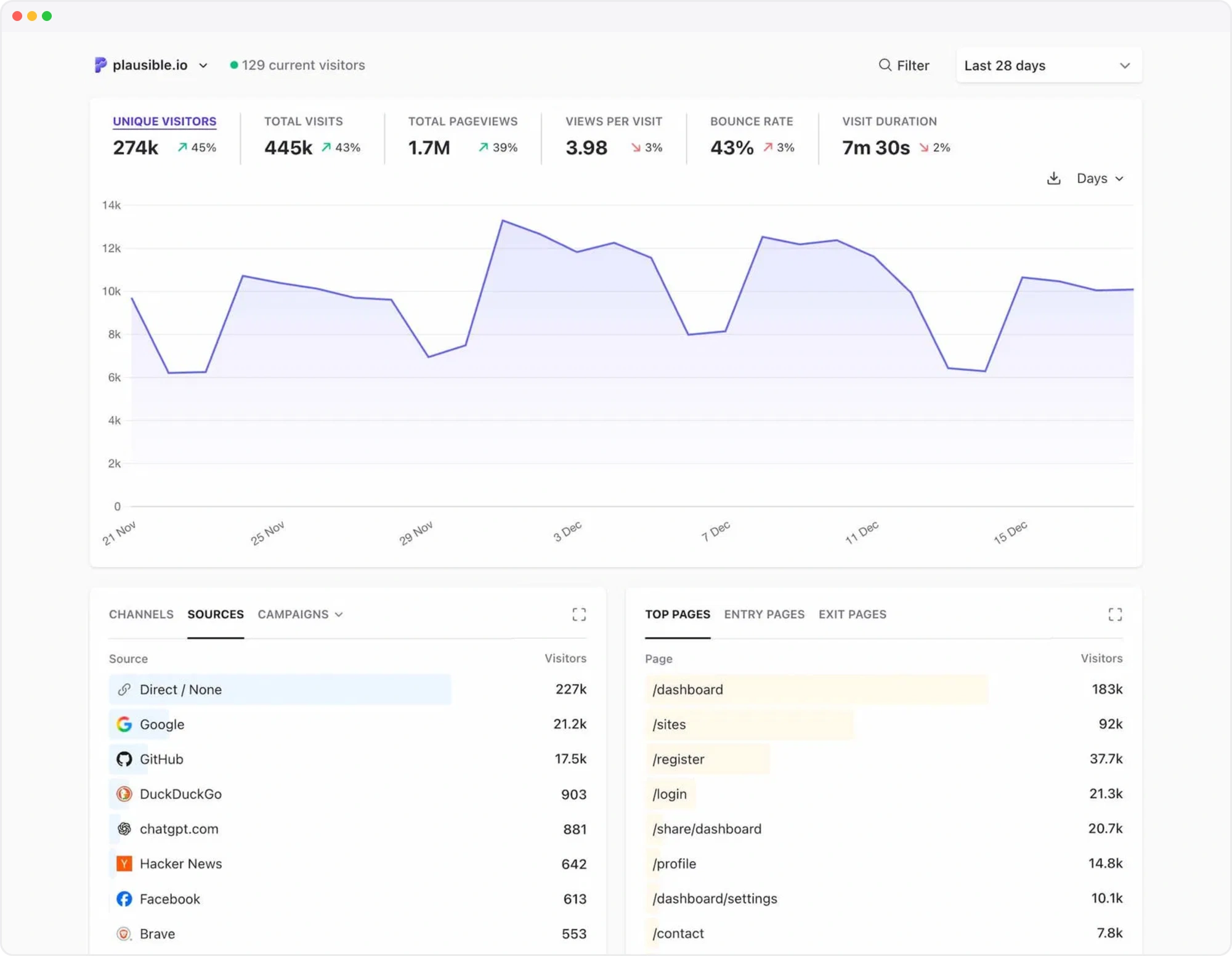
Plausible’s Community Edition dashboard illustration shows the period selector and traffic overview. Source: Plausible.
In GA4, configure the signup event and mark it as a key event—an event you identify as important. For the same weekly check, use the Traffic acquisition report with last week’s dates and a campaign breakdown, then review the signup key event alongside traffic. Page reporting answers the separate guide/pricing-page question. GA4 gives you more choices about which report and breakdown to use; CE keeps those routine questions together. In either case, reading reports is separate from implementing the signup measurement.

Google’s GA4 example filters the acquisition table to one source, google / organic. Source: Google Analytics Help.
Now change the question: where do visitors leave the guide → pricing → signup sequence? Separate page and goal totals do not reconstruct that ordered journey. A funnel measures a sequence of steps, and GA4 offers funnel exploration and path exploration to examine progression and recorded routes. Its richer ecommerce measurement also covers revenue and checkout behavior when configured, beyond simply counting purchase events.
Edition note: Plausible’s built-in funnels, user journeys, and ecommerce revenue goals are Cloud-only, not CE features. Generic Plausible documentation can describe both editions.
For advertising work, GA4’s audiences group visitors by recorded behavior. Google Ads linking lets those groups support actions such as reaching previous visitors with ads. Using a signup key event for bidding requires an appropriate Ads conversion configuration, beyond linking the accounts.
For broader analysis, attribution assigns credit to traffic sources, while web/app measurement brings activity from both environments into reporting. Following activity across days or devices depends on the available identifiers, configuration, and consent. This supports questions beyond CE’s daily visitor model, without promising recognition of every visitor.
Privacy and control: what changes when you host the analytics?
Plausible’s standard collection model uses a website-specific daily visitor identifier, without a persistent cookie or local-storage identifier. To derive measurements, it processes the request’s IP address and User-Agent—information about the browser and operating system. Those raw values are not retained in analytics records. Plausible does store event and session records to calculate aggregate reports; it does not keep only counters. The reporting trade-off is deliberate: this model does not recognize the same visitor across days or devices.
Privacy warning: Cookieless collection and self-hosting do not automatically establish consent exemption or legal compliance. Review the implementation, purposes—including campaign and signup measurement—and applicable jurisdiction. CNIL’s audience-measurement guidance, for example, describes conditional exemptions, not universal product approval.
GA4 also offers collection/privacy controls, including region-specific collection settings. With correctly implemented basic consent mode, relevant tags stay blocked without consent. Advanced consent mode can still transmit cookieless measurements when storage consent is denied. Consent mode implements those choices; obtaining consent and establishing a legal basis remain the website owner’s responsibility.

CE’s separate benefit is installation control: you choose a suitable host and govern administrator access. You can move the installation, and you decide how records are retained, deleted, and backed up. This lets you set storage practices for the installation rather than work only within a vendor’s service settings.
Confidentiality depends on how those choices are implemented, including provider access and applicable jurisdiction. Reverse-proxy logs may record incoming requests outside the analytics application, so review those alongside page paths and custom properties. Integrations and backup copies also belong in the retention and deletion policy. For signup measurement, record the outcome without adding an email address or user ID.
GA4 also supports raw-event export to BigQuery, Google’s cloud data warehouse. Export does not self-host GA4 or recreate its entire reporting model. Conversely, CE control does not provide unlimited free retention. Either way, collection and storage choices affect the budget.
Cost: free software is not a free analytics system
Start with two questions: What will you pay for, and who will do the work? CE requires paid hosting and someone to maintain the installation, with no Plausible license or subscription fee. GA4 has no standard service fee, and Google runs its backend. A shared server can spread CE’s hosting costs across applications; it still needs capacity in that budget.

Both tools need event setup and time to learn and analyze reports. Consent tooling may also be needed, and consulting is optional. For CE, ask whether maintenance is included in the hosting agreement or paid separately. If you do it yourself, record the time commitment even when no money changes hands. The yearly budget can stay simple:
CE annual monetary cost = a year of hosting + services outside the package + paid setup, reporting, and maintenance work.
GA4 annual monetary cost = €0 service fee + setup, tooling, and reporting costs + optional export or consulting costs.
For a monthly hosting quote, multiply the agreed price by 12. Add only services you actually buy beyond the package; included backups should not be counted twice. Paid work includes staff or contractor time. If you assign a money value to your own time, include it too; otherwise keep those hours separate. Optional BigQuery use can incur charges beyond free allowances, rather than a mandatory GA4 subscription.
For example, AVA.HOST advertises Plausible hosting from €10. Confirm the billing period and package scope before using that starting quote in an annual estimate. CE avoids Plausible Cloud’s subscription/pageview tiers, while hosting demand grows with traffic and stored events. Retention affects storage needs, and reporting queries consume resources. Whether CE costs less depends on those needs and the work involved in operating it.
Operations and security: what remains your responsibility?
The CE stack includes the application and two databases, or data stores: PostgreSQL for accounts/settings and ClickHouse for analytics records. Treat all three as one installation when assigning responsibility:
- Access/security owner: Keep database access private and dashboard/admin permissions appropriate.
- Changes/capacity owner: Track security releases and upgrades, check collection after updates, and monitor resources/storage.
- Recovery owner: Back up both databases plus configuration/secrets, with a workable restore process.
Plausible CE installation
├── Application
├── PostgreSQL — accounts/settings
└── ClickHouse — analytics records
That Cloud Apps package’s public page advertises provisioning with a custom-domain HTTPS endpoint. For ongoing upkeep, it lists automatic application updates and scheduled backups; terminal access is also included. This provides more automation than a bare unmanaged server. The page also lists limits relevant to operation and recovery:
Package note: According to the current public page, PostgreSQL is provisioned but unmanaged, and application email is disabled: scheduled email reports, invitations, and email-based recovery messages are unavailable in this package. These limits are package-specific. Confirm what database management, backups, and restoration cover before relying on the advertised automation for recovery.

Apply the same lens to GA4. Google operates the analytics backend, while your team designs tags and events and implements consent choices. You also manage account permissions and interpret reports. That means deciding who may change the measurement setup and checking that it still reflects the site’s business goals.
Upstream CE relies on community support; hosting support applies within the provider’s confirmed platform scope. GA4 offers documentation, community help, and available support channels, not an assumed dedicated standard-service contract or guaranteed response. Community advice, platform assistance, and contracted application management are different levels of help. Match support to the work your operator can handle, rather than treating either hosting model as inherently more secure.
Will the numbers match—and will the tracker slow the site?
Visitor/user counts, sessions—groups of activity during a visit—and goal/key-event totals can differ between tools. For example, repeating a goal on the same day and device can produce one unique conversion but multiple total conversions under Plausible’s metric definitions. Returning another day counts as another visitor. When comparing reports, match the reporting windows and time zones. Consent behavior and filters can also change which activity is counted, so a discrepancy alone does not prove either system wrong.

- Both tools depend on correctly installed tags: missing tags leave gaps, while duplicate tags can inflate counts.
- Blockers and browser content-security rules can stop collection requests, and self-hosting does not prevent that.
- If the collection endpoint is unavailable, neither tool can receive those measurements.
- Sites that change views without full reloads—single-page apps—need suitable navigation tracking.
- Bot filtering is imperfect, and CE has basic filtering rather than Cloud’s advanced system.
- Captured analytics activity is not an exhaustive business ledger; use your account or transaction records when you need authoritative business totals.
Plausible’s lightweight-tracker focus is a useful consideration when limiting page overhead. Actual page-speed effects depend on the rest of your site’s configuration; no speed or search-ranking improvement is established here. Weigh that design alongside the reporting and collection requirements below.
Which should you choose? A practical decision table

Use this as a requirement test, not a scorecard. Each row summarizes a trade-off; weigh it against your website’s needs.
| Criterion | Plausible CE | Standard GA4 |
|---|---|---|
| 🧭 Everyday usability | Focused dashboard for website traffic and goals | Standard reports plus configurable analysis |
| 📊 Reporting and integrations | Traffic sources, campaigns, and configured goals | Funnels, ecommerce, Google Ads, and web/app |
| 🔒 Privacy and data control | Limited daily identification; customer-chosen host | Configurable collection; Google operates analytics backend |
| 💰 Total cost | Free software; infrastructure and operator costs | Free standard service; setup and tooling costs |
| 🛠️ Operations and support | Named operator; community or scoped hosting support | Google operates backend; customer configures measurement |
| ⚡Collection and page impact | Lightweight focus; collection gaps and filtering limits remain | Tag configuration; collection gaps and filtering limits remain |
- Choose CE for content/business sites, SaaS acquisition pages, or modest multi-site setups when traffic/campaign/goals reporting suffices, placement/control matters, and someone owns operations. That person need not be the business owner.
- Choose GA4 for advertising-linked ecommerce, ordered funnel/audience workflows, native web/app needs, or teams unwilling to operate an analytics backend. A basic store counting purchases does not automatically need the broader workflow.
If unsure, run a short comparison using equivalent events and reporting windows. Keeping GA4 also keeps its collection and consent obligations.
A sensible next step if Plausible fits

For the guide’s owner, the practical next step is to settle reporting requirements and operating arrangements before choosing a hosting package:
- Your source, page, and completed-signup questions fit CE’s reports.
- Collection and consent purposes have been reviewed.
- Resources, price/terms, email needs, and backup/update scope are clear.
- Named owners cover access, updates, monitoring, and recovery.
AVA.HOST’s Plausible CE hosting page explains what its Cloud Apps package includes. This is a third-party hosting option for Plausible Community Edition, separate from Plausible’s own managed Cloud service. Review the package to see whether it meets your needs and confirm which maintenance tasks AVA.HOST handles and which remain your responsibility. Once you’ve confirmed that CE provides the reporting you need and the hosting arrangement suits you, deployment automation can simplify the initial setup.
Related Posts