English





How to Find a Specific File by Content in Linux
How to Find a Specific File by Content in Linux
Whether you’re debugging a web application, auditing server logs, or tracking down a specific configuration on your ava.hosting VPS or dedicated server, searching files by content is a vital Linux skill. Tools like grep, find, ack, and ripgrep make it easy to locate strings or patterns across thousands of files in seconds, saving you time and effort. For example, if you’re managing a web server on ava.hosting and need to find a misconfigured api_key in a config file, these commands can pinpoint it instantly. This guide provides a streamlined approach to searching file contents on Linux, optimized for efficiency and tailored for users leveraging ava.hosting’s reliable infrastructure.
Create a test directory with some files (create the directory that suits your needs)
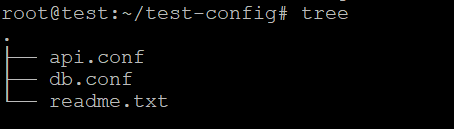
Let’s simulate a working directory with config files.
mkdir -p ~/test-config
cd ~/test-config
echo "db_user=root" > db.conf
echo "db_password=12345" >> db.conf
echo "api_key=abcdef" > api.conf
echo "some random data" > readme.txt
Now you have:
The Classic: grep + find
🔍 Search recursively for a string in all files:
grep -r "password" ~/test-config

Filter by file type using find:
find /path/to/search -type f -exec grep -l "search_term" {} +
find . -type f -exec grep -l "password" {} 
. = current directory
-type f = only files
-exec grep -l “password” {} + = run grep on the files and show only those that contain “password”.
2. More Powerful: grep with regex and file extension filtering
Example: Find all .conf files under /etc/ that contain “max_connections”
find . -name "*.conf" -exec grep -Hn "max_connections" {} +

find . — searches from current directory
-name “*.conf” — only targets .conf files
-exec grep -Hn — searches for the string max_connections
-H prints filename
-n prints line number
Advanced Tools for Codebases
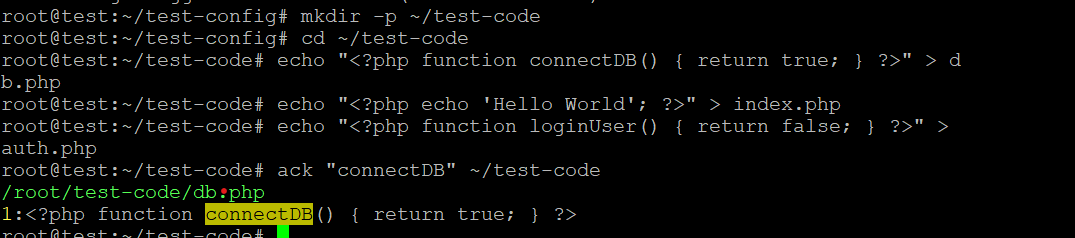
🔍 ack – Fast, smart grep for programmers
Ignores .git, node_modules, vendor/, etc.
Supports regex and file type filters
Faster and cleaner than grep in dev environments
Install ack (if not already installed)
sudo apt install ack-grep # Debian/Ubuntu
brew install ack # macOS
ack "connectDB" ~/test-code
⚡ ripgrep (aka rg) – Fastest grep alternative
Ultra-fast (written in Rust)
Recursive by default
Syntax highlighting
Git-aware (skips .gitignored files)
✅ Install:
4. Searching as Root
Some system files require elevated permissions:
Or when combining with find:
2>/dev/null: suppresses permission errors
5. Case-Insensitive & Whole Word Search
Case-insensitive:
Whole word:
Combine: grep -rwi “word”
Pro Tips
✅ Avoid binary files:
✅ Limit depth:
✅ Log file search with date:
Bonus: Using sed or awk to extract content from matched files
Example – extract matched line + 2 lines after:
Or use awk to extract patterns:
Conclusion
Mastering file content search in Linux transforms how you manage and troubleshoot systems. Whether you’re using grep to find a password in a config file, ripgrep to scan a codebase, or find to locate specific logs, these tools make debugging and auditing a breeze. For instance, you might use rg "error" /var/log to quickly identify issues in your ava.hosting web server logs or find to locate misconfigured settings across your VPS. With these commands and ava.hosting’s reliable infrastructure, you can streamline workflows, enhance security, and keep your systems running smoothly.
Related Posts