English





How to Add a User to the Root Group and Grant Privileges in Linux (Safely and Securely)
How to Add a User to the Root Group and Grant Privileges in Linux (Safely and Securely)
Granting root-level privileges to a user in a Linux system is a powerful and dangerous task. It’s essential when managing servers, automation, or giving sysadmins full control — but it must be done correctly and securely to avoid exposing your system to vulnerabilities or irreversible mistakes.
In this article, we’ll explore how to add a user to the root group, grant root privileges, and cover best practices and security implications.
🧠 Understanding Linux Privilege and the Root Group
In Linux, root is the superuser with unrestricted access. However, regular users should never operate directly as root. Instead, privileges can be delegated using:
- The sudo mechanism (via /etc/sudoers or /etc/sudoers.d/)
- Group-based access (assigning users to the root or sudo group depending on distribution)
⚠️ Before You Begin
- You must have sudo or root access.
- Use these steps only for trusted users.
- Always create a backup or test in a sandboxed environment.
🛠️ Step-by-Step: Add a User to the Root Group and Grant Privileges
🔹 Step 1: Create the User (If Not Exists)
You’ll be prompted to set a password and optional metadata for the user alice.
🔹 Step 2: Add the User to the Root or Sudo Group
On Debian/Ubuntu-based systems, the sudo group is used:
On RHEL/CentOS/Fedora, use the wheel group:
🔎 wheel is a traditional Unix group used for administrative access.
If you really want to add the user directly to the root group (not recommended):
❗ This may break security boundaries, especially if your PAM or SSH config treats root differently.
🔹 Step 3: Verify Group Membership
Expected output:

🔹 Step 4: Grant or Edit Sudo Privileges (Optional but safer)
To explicitly grant privileges via sudo:
- Edit sudoers file safely with visudo:
- Add:
alice ALL=(ALL) NOPASSWD:ALL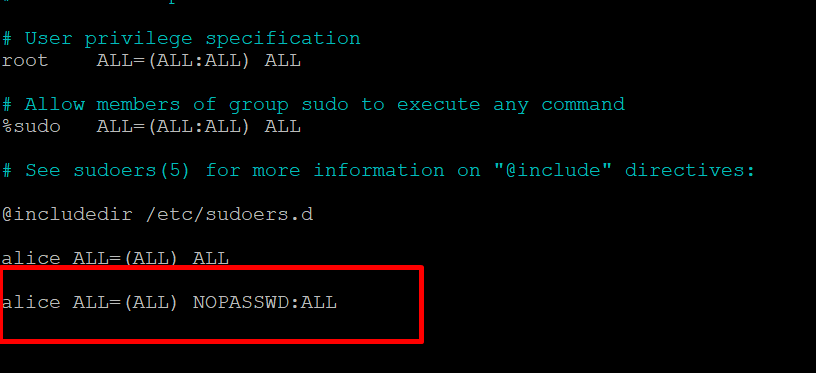
🔐 You can restrict commands or add a password requirement if needed:
✅ Bonus: Test Privileges
Log in or switch to the user:
Test root access:
Expected output:

🚫 Security Warning: Don’t Do This Lightly
- Avoid adding users to the actual root group unless required for legacy compatibility.
- Prefer the sudo or wheel group with limited commands using sudoers rules.
- Monitor logs via:
sudo journalctl -xe | grep alice

🔐 Advanced Tip: Grant Root Privileges for Specific Commands Only
In /etc/sudoers or /etc/sudoers.d/alice:
This allows the user to restart Nginx only — a safer approach.
🧩 Troubleshooting
| Problem | Solution |
|---|---|
| User still can’t run sudo | Log out and log back in (or restart session) |
| “User not in sudoers file” | Check /etc/sudoers syntax via visudo |
| SSH doesn’t allow login | Check /etc/ssh/sshd_config for AllowGroups |
Step 5: Removing a User from the sudo or root Group
If you need to revoke sudo or root privileges from a user, you can remove them from the respective group with the following command:
Removing a User from the sudo Group
sudo deluser username sudo
Replace username with the user’s name. This command removes the user from the sudo group, revoking their ability to execute commands as a superuser.
Removing a User from the root Group
sudo deluser username rootСonclusion
Granting root privileges or adding a user to the root group in Linux may seem like a simple administrative task, but it carries significant implications for system security, stability, and accountability. On modern production systems, privileged access must be granted thoughtfully and sparingly.
Whenever possible, you should avoid giving users direct access to the root account. Instead, use the sudo mechanism, which allows users to perform administrative tasks with elevated privileges without exposing the root password. This not only adds a layer of protection but also ensures that actions are logged and traceable.
Following the principle of least privilege is key: assign users only the access rights they absolutely need, and nothing more. This minimizes the potential damage in the event of misconfiguration, user error, or compromise.
Regular auditing of user permissions, sudo usage logs, and system access reports should become part of your routine system maintenance. In larger environments, centralized logging and monitoring tools can help you maintain visibility and respond quickly to suspicious activity.
Related Posts