English





How to Add a New User in Debian
How to Add a New User in Debian
Managing user accounts is a fundamental part of Linux system administration. Whether you’re setting up a new developer account, creating user roles for security, or managing a VPS or dedicated server, knowing how to add and configure users in Debian is essential.
This guide will walk you through the steps to add a new user in Debian, set permissions, and ensure security best practices.
Step 1: Log in as Root or Use sudo
Before adding users, you need administrative privileges. Log in as root or use sudo with your regular account.
su -
 # or
 sudo -i
Step 2: Add the New User
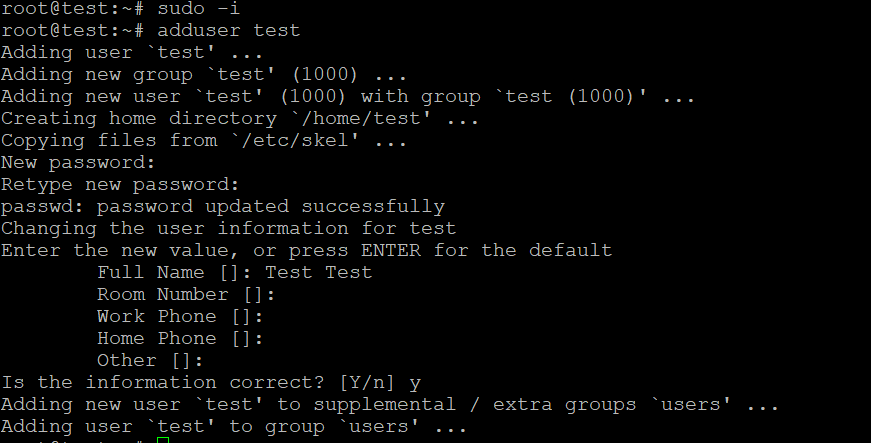
Use the adduser command, which is interactive and user-friendly:
You’ll be prompted to:
Step 3: Grant Sudo Access (Optional)
If the new user needs administrative rights:
This adds the user to the sudo group, giving them permission to run commands as root using sudo.
Step 4: Verify the New User
Switch to the new user account to verify:
su - newusername
Try a sudo command (if you added to sudo group):
Optional: Customize User Settings
You can:
Set user shell:
Set account expiration:
Lock user temporarily:
Security Best Practices
Use strong passwords.
Avoid giving sudo access unless necessary.
Audit users regularly with:
Use SSH keys instead of passwords for remote login when possible.
Use Case: Adding Users on a Hosting Server
On VPS or dedicated hosting (e.g., for web development or managing team access):
Each user can have their own SFTP login
Limited shell access enhances security
Useful for shared hosting environments or web app deployment
Many hosting providers like AlexHost, DigitalOcean, or Hetzner allow this on unmanaged Linux servers.
Conclusion
Adding a new user in Debian is a straightforward task that enhances system management, improves security, and supports multi-user environments. Whether you’re running a personal server or managing multiple users in a hosting setup, following these steps ensures a secure and organized Linux system.
Related Posts